
creating_editing_custom_menus
Creating & Editing Custom Menus in WordPress
If you find that new pages you create in WordPress aren't showing up in the menu, the site in question may be using a custom menu. These are very convenient because you can have pages hidden from view and to have a few pages in progress before they are visible to users
Editing a Custom Menu
From the dashboard: 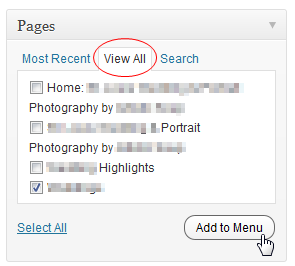
- Go to Appearance > Menus
- On the top right, look for one or more menu name tabs
- Click on a tab
- You'll see a menu “tree” of pages and links
- On the middle / bottom left, there are 2 panels
- Custom Links
- Pages
- Your full list of all the site's pages are in the Pages panel
- If you don't see your page there, click the View All tab in that panel
- Locate the page you just made and check the box next to it.
- Click the Add To Menu button
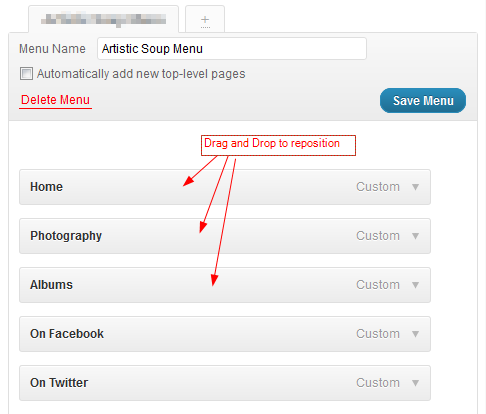
- Note: your new page / link will show up at the bottom of the menu Tree
- Click, Drag and Let go of your menu item when it's in the location you choose
- You must click Save Menu for your changes to show up
Custom Links
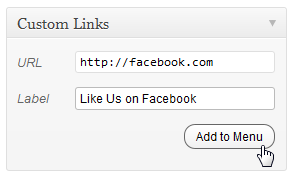
If you need to add a custom link, (e.g. link to Twitter or Facebook)
- Paste the URL (http://www.example.com)
- Add a name in the Label field what you want to be displayed
- Click the Add to Menu button
- Reposition your menu item by dragging / dropping
- Click Save Menu button
creating_editing_custom_menus.txt · Last modified: by 127.0.0.1