
This is an old revision of the document!
Table of Contents
Custom Home Server Build
From long ago I've wanted to build my own home server. This goes back almost 10 years. I sketched it out. The ideal home server I think for me size seems to be a 6 drive situation. Hot swappable with plenty of redundancy. Being able to back up my existing server automatically syncing is a major key. That way there's redundancy, out in the garage, so if there's a disaster in the home, my files are backed up.
What about existing NAS solutions? well those are appealing for sure. They give you the hardware and may or may not include the drives. and of course the software will presumably work out-of-the-box.
Resources
- PerfectMediaServer - https://perfectmediaserver.com/
Standalone Box vs a rack server?
A standalone box has been the most attractive so far because it can be placed in various locations as needed. Going with a rackmount situation brings some attractive ideas, but also drawbacks. Generally rack servers come with smaller and louder fans. A rack takes up a hell of a lot more space than a standalone box. so the footprint is bigger. The rackmount would enable stacking or adding other piecs of equipment and trays or overall electronic storage if configured a certain way. A rackmount is probably out of the question overall unless an idea is made to do a full technology option where a high end security situation would be good.
Premade NAS options
- QNAP TS-653A 6-Bay 8GB RAM - Intel Celeron N3150 Quad Core 1.6GHz - $850.00
- U-NAS Servers or Chassis - $220.00+ comes in chassis only or full server with U-NAS software
- U-NAS 8-Bay Micro ATX Chassis - $220.00 - Larger MOBO w/ card slots
- FreeNAS Mini and Mini XL - Configured could be $1500 - $3500
- Kobol ARM NAS - https://www.kobol.io/ $300 for their helios 64 (sells out frequently I think).
Other NAS Ideas and Projects
- Inexpensive ARM based NAS https://hackaday.com/2018/09/18/arm-based-nas-is-a-low-cost-low-power-beauty/
Hardware
Enclosures
Parts list, case, drives, processor, mobo, memory, expansion cards (raid), power supply, UPS. I can generate a list at PCPartsPicker. It would be good to have a list fully done here with links. Photos of the hardware too.
Silver Stone Case 8
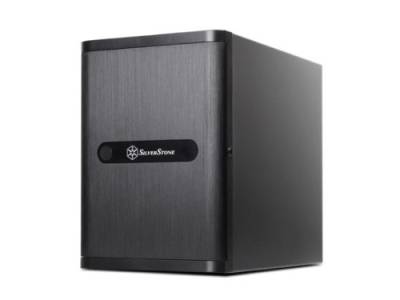
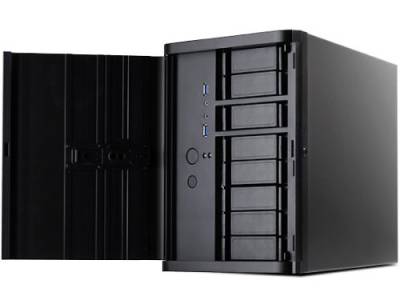
Case - Silver Stone DS380B NAS Case
- Support 12 total drives with 8 hot-swappable 3.5“ or 2.5” SAS/SATA and 4 fixed 2.5“ drives
- Unbelievable storage space and versatility for small form factor
- Premium brushed aluminum front door
- Support graphics card up to 11” with supporter design from TJ08-E
- Lockable power button design and adjustable LED from GD07
- Includes three 120mm fans with filtered intake vents
U-NAS Servers and Chassis
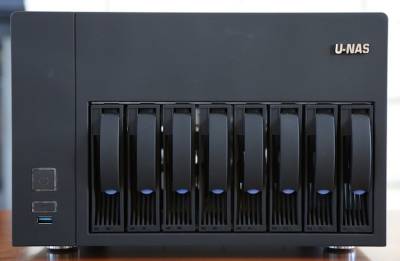
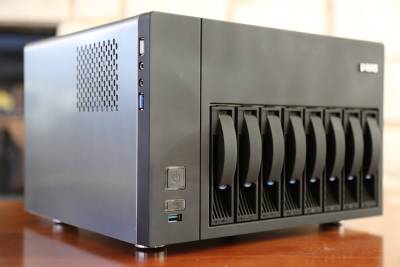
Dont' forget the U-NAS cases. There are 8-bay that allow for Micro ATX Mobo instead of the more limited Mini-ITX.
- U-NAS 8-Bay Micro ATX Chassis - $220.00 - Larger MOBO w/ card slots
- Note: you may need to add a 90 deg angle PCI express riser
Some questions:
- Do I go for 3.5 drives, 2.5 drives, mechanical or flash
- Do I attempt to put OS onto a separate card, such as an SD card to SATA
- Trade off between security and online access
- Physical security and network security.
- Physical mounting maintaining necessary airflow
- Affordable uninterruptable power supply and power surge protection
SuperMicro Chassis
Ran across this on NewEgg - SUPERMICRO CSE-721TQ-250B
Norco Chassis
NORCO ITX-S8 Black Black Mini-ITX Form has lots of bays, and is a decent price. Reviews aren't great. Seems like U-NAS would be better.
- JONSBO N1 NAS Server Storage - https://www.aliexpress.com/item/1005003125774264.html
Motherboard
I expect a Supermicro motherboard with a lot of SATA ports, and handle it all software RAID. There are affordable hardware RAID cards and that may be worth investigating but there are factors to know about that.
- What happens if hardware raid card fails? Can a replacement of diff model work seamless?
- Any concern of performance hardware vs software?
- If software raid fails, will swapping the MOBO be enough?
- What type of raid is best based on amount of expected drives? RAID 10? RAID 6? UnRAID?
- BTRFS and Drives
- Failure points of MOBO
- Industrial or Enterprise MOBO vs consumer reliability
- Pairing MOBO with Memory and again longevity and reliability
Some Possible MOBO Choices
- MSI Z971 AC - Mini ITX Military Grade Components
- MSI X299M - Micro ATX Gaming MOBO with 8 SATA ports
- SUPERMICRO MBD-X11SSM-F-O Micro ATX Server LGA 1151 - 8x SATA3 (6 Gbps) via C236; RAID 0,1,5,10
- SUPERMICRO MBD-X11SSH-F-O - Micro ATX - Intel Xeon E3-1200 v6 / v5, Intel 7th / 6th Gen. Core i3 series
Processor Chip
Processor could be the main workhorse for certain transcoding processes. Also there are intel Xeon chips vs standard Intel chips. There are probably reliability charts. It'd be good to make sure that the pin layout is standard and also look at ease of replacement down the road.
Memory
Server memory has better longevity and handling as far as withstanding errors due to electrical signal anamolies. ECC RAM would be a good choice but may not be necessary. Depends on the pairing. Do the research.
Processor Cooler
Cooling the processor all the time, it's nice to get a reliable fan and heat sync. A bigger fan will push more air with less power due to momentum and be quieter. Price isn't really an issue with coolers as much as space and noise are.
- Note: Part of server monitoring is being able to monitor the cooler, fan speed etc.
Monitoring Electrical Usage / Cost
Getting the server usage costs is important. Plug in one of the monitors of the server for a while or find something as part of the UPS to monitor it in watt hours and cost. Ideally it won't be consuming much power. Any always on device it's good to get a baseline of usage and cost per year.
Software
OS, configurations (drive mounting) add-on scripts, file system type, vms, video transcoding, plex, other plugins, security features, home automation, security, upgrade process, security system, vpn, remote access, online file access.
- FreeNAS - The tried and true
- Open Media Vault - SSH, (S)FTP, SMB/CIFS, DAAP media server, RSync, BitTorrent client & more
- Ubuntu Server (Ansible NAS) - One guys solution
- CentOS, Redhat - Rockstor does this already on CentOS 7 - Redhat Docs
- OpenFiler - Bit boring interface
- Clear OS - Home or SOHO software
- Zentyal - Linux Small Business Server
- Rockstor - BTRFS Linux software (possibly subscription based)
- Xigmanas - BSD software
- https://xpenology.org/ - Xpenology - a hack of the Synology software
- List of self-hosted apps at github - https://github.com/awesome-selfhosted/awesome-selfhosted
- Emby - https://emby.media/
- Heimdall server dashboard - https://heimdall.site/
Other Software Apps
- NextCloud (OwnCloud)
- cPanel
- WHM
- Proxmox?
- ISPConfig?
Based on what you need, this extra software could make for some interesting features. Ideally these could be affordable so I'm not paying per month for services I don't use all the time.
Unit placement and Securing to Location
The plan has been to put a backup server in a separate building such as my garage. This would mean that if there was a disaster in the main building, the extra server would still have everything. Eventually computers fail, and it could happen any day now for my existing server, including a total electronic failure due to lightning strike.
If the server is in the garage, you want it to be somewhat protected from absolute temperature extremes. Or ensure that the hardware will handle the temperature changes.
File System Definitions
BTFRS (better FS) - file system based on the copy-on-write (COW) principle, initially designed at Oracle Corporation for use in Linux. Btrfs is intended to address the lack of pooling, snapshots, checksums, and integral multi-device spanning in Linux file systems.
ZFS - is a combined file system and logical volume manager designed by Sun Microsystems and registered as a trademark of Oracle Corporation;ZFS is scalable, and includes extensive protection against data corruption, support for high storage capacities, efficient data compression, integration of the concepts of filesystem and volume management, snapshots and copy-on-write clones, continuous integrity checking and automatic repair, RAID-Z, native NFSv4 ACLs, and can be very precisely configured.
Video: ZFS - The last word in file systems
NFS - Network File System (NFS) is a distributed file system protocol originally developed by Sun Microsystems in 1984,[1] allowing a user on a client computer to access files over a computer network much like local storage is accessed. NFS, like many other protocols, builds on the Open Network Computing Remote Procedure Call (ONC RPC) system. The NFS is an open standard defined in Request for Comments (RFC), allowing anyone to implement the protocol.
NTFS NTFS (New Technology File System)[1] is a proprietary file system developed by Microsoft. Starting with Windows NT 3.1, it is the default file system of the Windows NT family. NTFS has several technical improvements over the file systems that it superseded – File Allocation Table (FAT) and High Performance File System (HPFS) – such as improved support for metadata and advanced data structures to improve performance, reliability, and disk space use. Additional extensions are a more elaborate security system based on access control lists (ACLs) and file system journaling. NTFS is supported in other desktop and server operating systems as well. Linux and BSD have a free and open-source NTFS driver, called NTFS-3G, with both read and write functionality. macOS comes with read-only support for NTFS; its disabled-by-default write support for NTFS is unstable.
exFAT - exFAT is a proprietary Microsoft file system that was designed to bridge the gap between the NTFS file system and the more dated FAT32 file system. Its main advantages are that it can store files over 4GB since it is a 64-bit file system. is a Microsoft file system introduced in 2006 optimized for flash memory such as USB flash drives and SD cards.[5] It is proprietary and Microsoft owns patents on several elements of its design. exFAT can be used where the NTFS file system is not a feasible solution (due to data structure overhead), yet the file size limit of the standard FAT32 file system (i.e. 4 GiB) remains in those scenarios. exFAT has been adopted by the SD Card Association as the default file system for SDXC cards larger than 32 GiB
Don't want to build it custom?
- QNAP
- Synology
- Others?
Other people's builds
- RAID OWL on Youtube - https://www.youtube.com/c/RaidOwl/videos
One commenter:
New simplec setup is working pretty well at the moment.
* ODROID XU-4 with Gigabit Ethernet * Anker 9-port USB3 Hub * 4x UGREEN USB to SATA Adapter with UASP Support * 4x 4TB 3.5″ SATA HDD
I haven’t done much testing with multiple simultaneous drive read/writes but I can get 100 MByte/s write speed to single disk over the network, which is the same as the old AMD Phenom server I had previously.
Only downsides are that it’s a little messy with all the PSU wiring, the UGreens (or XU4) spins down the drives too quickly and the UGreens need some sort of bracing to connect them securely to the disks. Hot glue FTW 