Replacing images
Out of the box, WordPress doesn't have a feature to replace a picture that's in a specific setting with the same name. A plugin called Enable Media Replace was created to add this functionality to the Media Gallery.
In order to replace media, you first have to find your image within the media gallery.
- Login to WordPress Dashboard
- Hover on the Media and Click on Library
- Search for your file - you may have to browse pages, OR type in a search term
- In this example, we'll search for the word “slide” since we know it's one of the files on our slideshow that we want to replace.
- Once the files come up Click the Edit button for the file you want
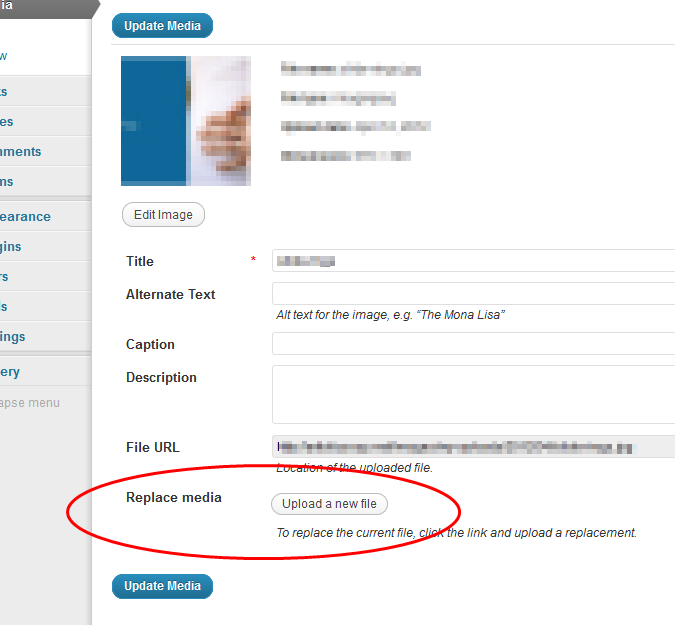
- Click on Replace Media
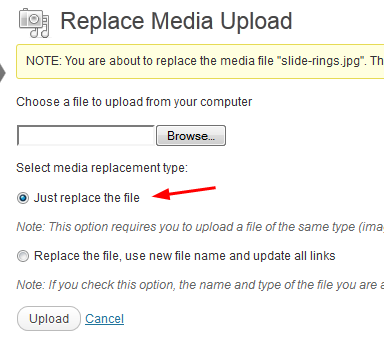
- On the replace media screen click Browse and find your replacement
- Note the radio button for “Just replace the file” is the default section and probably what you want.
- Click upload and you'll see the file update on the page after this process
Searching for your media / image

Click the Edit Button

Click the Media Replace Button
Browse to replace your file