Change Hosts Extension in Firefox
The change hosts extension will allow you to quickly update your hosts file so your browser can point to special pages.
How to change your hosts for the site:
- get the change hosts extension for Firefox: https://addons.mozilla.org/en-US/firefox/addon/change-hosts/
- Restart Firefox after installing extension
- After installed go to Tools > Addons (in firefox top menu)
- Click on preferences for the change hosts extension
- Make sure you're on the definitions tab of this change hosts preferences window
- It should have your current default hosts file - click on Edit button
- Select the contents of that host file, and press Ctrl-C to copy it.
- Then you can cancle out of that, and Add a New Definition (name it plenaform if you like)
- Paste the contents you just copied in the edit window there THEN add the following to lines underneath that:
- 000.000.000.000 example.com
- 000.000.000.000 www.example.com
- Click save and choose
- You may need to restart your browser, but it should eventually work and go to the new site
Permissions Issue
It's very likely our computer will need to allow you permissions to edit the file, here's how to do that.
- In Windows, navigate to C:\Windows\System32\drivers\etc\
- Find the file called hosts
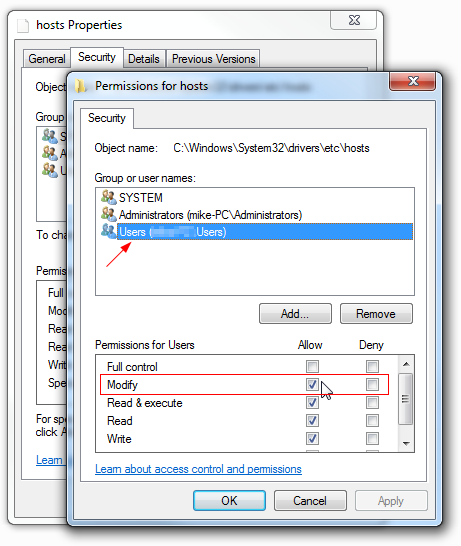
- Right-Click the hosts file, choose Properties
- Click the Security tab
- Click the Edit button next to Change Permissions
- Choose the Users option and Click the checkbox for Modify (this gives users Modify permissions to this file)
- Note this is actually dangerous as it makes your PC a little more susceptible to viruses. Please do not do this if others (mis)use your computer and could acquire a virus through downloading programs or browsing seedy websites.
- After clicking apply and ok, you can go back to change hosts and try to save and choose again.